

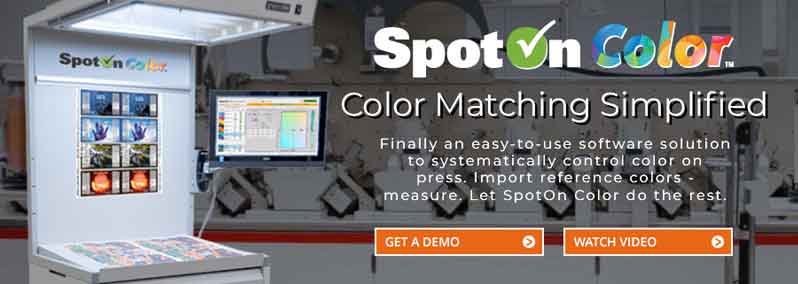
Color Control On Press... Systematically, Running to Delta E

Easy to Use
Color communication (Spectral Data, CIELAB, CIELch, Chroma, Hue, Saturation) can be difficult, especially in the press room where no press adjustments exist for any of these items. SpotOn Color makes this ...
Learn more
No More Guessing
For a long time, there have been only two ways to match the color on press: Formulate or Guess. The "Formulate" method, used in the ink mixing department, is very precise. Each step is tested and documented...
Learn more
How It Works
SpotOn Color uses spectral data to provide optimal density information, allowing the operator to run a color to match a reference color. This software compares the spectral data of a color measured on a press pull ...
Learn more
Awards, Partnerships & Certifications
(Note: These were awarded to SpotOn! Flexo, the original version of SpotOn Color.)

FTA Technical Innovation Award
The Flexographic Technical Association (FTA) named All Printing Resources (APR) and SpotOn! Press winners of its prestigious 2014 Technical Innovation Award. SpotOn! Flexo Technology co-developed by the two companies, was the winner...
View details
Color-Logic Technology Partner
Color-Logic has named All Printing Resources (APR)–the exclusive North American distributor of SpotOn! Flexo–a technology partner. Announcing the partnership, Color-Logic Director of Sales and Marketing Mark Geeves commented...
View details
Esko Full HD Flexo Certification
All Printing Resources (APR) and SpotOn! Press are pleased to report that their SpotOn! Flexo pressroom software has received Esko Full HD Flexo certification. Full HD Flexo is the new standard for flexo quality. Companies that are HD Flexo...
View detailsTESTIMONIALS

As an envelope manufacturer who prints spot colors daily, SpotOn Flexo has been a great measuring tool for us. Having used SpotOn Flexo for 7 years, we have built a database of PMS spot colors and custom colors that help ensure consistent matches on repeat orders. SpotOn Flexo is very easy to use for everyone. Although our managers, pressmen, and ink techs are very experienced, they are not necessarily experts on the science of color. SpotOn Flexo makes the process simple for everyone, and you don’t have to be an expert. The user interface matrix makes it easy to understand the logic behind the madness.

SpotOn! Flexo is a simple, effective way to limit color variation and run to delta E. We use it on our production floor every day, because it works.

Spot On has helped in several areas. The initial expectations were that we would see less makeready time and material by offering our operators the tools needed to hit color targets sooner and improve accuracy. The secondary advantage, and arguably even a great benefit, is our ability to control color throughout the course of a run by making the trending and adjusting color simple and effective. Clients love it, too!

My Students use SpotOn! Flexo to verify color matches press side. The program is so simple to use and allows even new press operators to accurately match the color by knowing if they can hit it with an anilox change or if they need to reformulate the ink. The use of Lab* can be confusing or overwhelming to individuals without the proper understanding of what it all means. The simplistic use of 3 colors and up/down arrows to communicate to the operator how they can improve their color match makes this software very user-friendly and easy to interpret.

SpotOn! Flexo has proven to be a user-friendly press-side tool for managing color. SpotOn! Flexo sets us apart from other manufacturers by giving us the ability to provide the quality and repeatability needed to meet our customers' increasing demands.

We’ve been running SpotOn! flexo for five years. As every label converter knows, matching color and keeping color consistent can be a challenge. SpotOn! enables us to make sure we’re being consistent from run to run. It also allows us to have a database of custom colors for customers, and a specific color can be pulled at any time. SpotOn! is really user-friendly. I think if suddenly it disappeared, we’d have a mutiny. We don’t have any other option that is as easy to use, or that is as practical for what we’re doing.
SPOTON COLOR FREQUENTLY ASKED QUESTIONS
How do I activate my SpotOn Color software?
- You can purchase an activation code for SpotOn Color at any time, by calling All Printing Resources at 1-800-445-4017.
Is there a SpotOn Color User Guide?
- The User Guide for SpotOn Color is being developed. A series of tutorial videos will be available to you once they are finalized.
What computer platform does SpotOn Color require?
- SpotOn Color runs on Mac OSX 10.5 or higher, Windows XP, Windows 7, Windows 8, and Windows 2003 Server, Windows 2008 Server or higher.
Is SpotOn Color a stand-alone application or client/server?
- SpotOn Color is available in a Stand-Alone or Client Server Version.
Can the user create their own Delta E tolerances?
- Yes. SpotOn Color allows the user to create both a DeltaE (ΔE) warning level and a tolerance (or fail) level using all of the current Delta E equations, ΔE76, ΔECMC (2:1), ΔE 94, and ΔE00.
What type of spectrophotometer is required to use SpotOn Color?
- SpotOn Color requires the instrument to report spectral data. The current measurement instruments supported are:
- Techkon SpectroDens
- X-rite eXact
- X-Rite i1 Pro, i1 Pro 2, i1 Pro 3 (restricted)
- X-Rite Ci64 (spherical)
Konica-Minolta MYIRO-1- Discontinued Product
How can you create the color libraries (reference colors) required in SpotOn Color?
- Spot color libraries can be created in one of three ways:
- Color references can be imported from an ink formulation software as a .mif or .cxf file.
- Color references can be measured into SpotOn Color using a supported spectrophotometer.
- Migration from legacy SpotOn! Flexo Jobs.
Can you associate specific metadata to a job so it can be searched or reviewed at a later date?
- Yes. SpotOn Color has several options for attaching metadata to a specific job and/or color. All of these metadata fields are searchable.
Can SpotOn Color separate Make-Ready readings from actual Production readings?
- Yes. Each time you make a measurement, you can select a radio button to designate the measurement as a Make-Ready or Production measurement.
Can you search the color library to find specific colors?
- Yes. Keyword Searches based on a color name or metadata allow the user to filter and search for specific colors. A sample can also be measured, and SpotOn Color will search the entire color library for related colors, sorting them by closest ΔE match.
Do you always have to read the substrate prior to making any color measurements?
- Yes. SpotOn Color uses spectral data to compare the reference and measured color. The calculation is based on the color reading, including the white point or substrate.
If you have a measurement error, can you delete the measurement and/or read the measurement again?
- No. Once you save the measurement, it cannot be edited or deleted; however, while you are in measurement mode, you have complete visibility of the measurement results and can continue to adjust and re-measure, update related metadata data, and add comments until you are satisfied with the measurement set and are ready to save.
What does the Density / ΔE chart represent?
- The center vertical line represents the optimal density at the lowest ΔE value to reproduce the selected spot color. The Black curved line represents the ΔE variations associated with the densities along the bottom of the chart. You can hover your mouse along the Black curved line and see the relationship between ink density and ΔE.
What does the ΔL* and Chroma/Hue Deviation Graph represent?
- The left-hand bar represents the difference between the measured color and the reference color at the current density, and the right-hand bar represents the predicted difference between the measured color and the reference color if they are run at the suggested density. The ΔL* graph shows the L* deviation (too light or too dark). This, in conjunction with the Chroma/Hue graph, helps the operator visualize the current measurement in comparison to the predicted potential improvement.
Is there any reporting functionality in SpotOn Color?
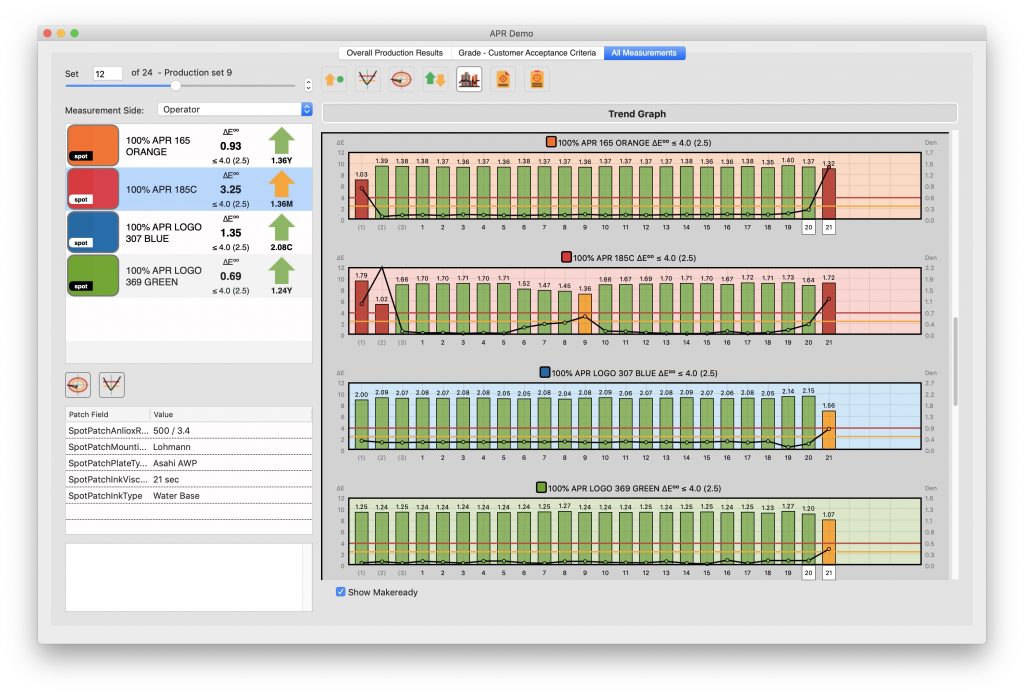
- Yes. SpotOn Color includes a Trend Graph that quickly gives you a historical view of the measurements you have taken and provides ink density and Delta E values. Users can also explore detailed job and color statistics. Additionally, you can export reports with this information and associated metadata. The report can be customized with your company name and logo.
We currently have pressroom software, how is SpotOn Color different?
- SpotOn Color was designed specifically as a tool for press operators. It offers functionality other solutions do not and could replace or expand on the tools the operators currently have for troubleshooting. For facilities using ink formulation software and tools in the pressroom, press operators will likely agree those solutions are not optimized to help them troubleshoot or resolve color issues on press. Ink formulation software is very powerful for creating or establishing standards or reference colors and tracking these colors from batch to batch, but it was never designed to be used press-side and lacks important information required by the press operator, such as feedback for ink density adjustments and tracking production settings. SpotOn Color is the perfect complement to ink formulation software, providing the critical feedback a press operator needs for color optimization on press and quickly identifying when an ink requires reformulation.
GENERAL SUPPORT FOR SPOTON COLOR
Tutorial Videos
Click here for a series of tutorial videos.
Getting Started Guide
Download: SpotOn Color User Guide, Adobe PDF - 11.9 MB
PLATFORM REQUIREMENTS
Macintosh minimum

|
64bit Mac capable of running mac OS 10.13 or newer (Big Sur is supported). Recommended 8 GB of RAM. 100 MB of free hard drive space for the application and additional free space for local database files. The actual amount depends on usage and demand. |
Windows minimum

|
64bit PC capable of running Windows 10 or newer Recommended 8 GB of RAM. 100 MB of free hard drive space for the application and additional free space for local database files. The actual amount depends on usage and demand. |
Supported Servers
SpotOn Color requires a client-supplied database when used in networked mode (multi-user). Supports local database, MS SQL (and Express), MySQL, PostgreSQL, and CubeSQL.
Server OS is recommended but not mandatory.
Server storage and bandwidth requirements are minimal, but will need to be scaled with the number of clients and demand put on the system. Virtual server environments are supported.
Supported Spectrophotometers
- Techkon SpectroDens
- X-Rite eXact
- X-Rite Ci64 (Windows only, ∆E and Spectral only)
- X-Rite i1Pro/2/3/Plus* (supported in SpotCheck module, which is included in Production and Creator licenses)
Konica Minolta MYIRO-1- Discontinued product
* i1Pro is restricted from use in pressroom software by X-Rite.
SUPPORT FAQs
Does SpotOn Color calibrate my spectrophotometer, or is this done separately?
SpotOn Color supports many popular spectrophotometers. Most of the supported spectrophotometers are calibrated through SpotOn Color. The spectro will automatically connect but can be disconnected, re-connected, and calibrated by selecting the menu for the related device.
Can I back up my SpotOn Color color libraries?
- Yes. More detailed instruction is under development.
Can I move SpotOn! Flexo from one computer to another computer?
- Yes. More detailed instruction is under development
Will this operate in a virtual environment?
- Virtual server environments are supported.
What are the CPU/Memory/Storage requirements?
- 64bit. Windows 10 or newer, Mac OS X 10.13 or newer. Minimum of 300 MB free hard drive space. Minimum of 8 GB Ram.
What are the Supported Server Operating systems?
- Server OS is recommended but not mandatory. Server storage and bandwidth requirements are minimal, but will need to be scaled with the number of clients and demand put on the system. Virtual server environments are supported.
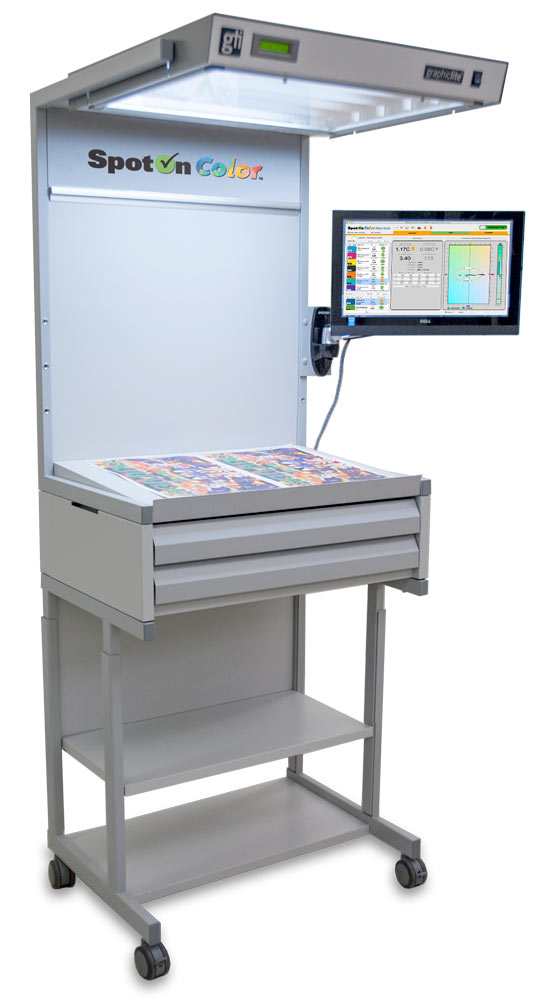
The SpotOn Color Quality Control Center is an all inclusive solution from APR that includes:
- GTI Viewing Booth; EVS 2028 viewing booth on casters with two drawers.
- Windows touchscreen PC mounted to viewing booth. Wireless keyboard & mouse also included.
- SpotOn Color installed on the Windows computer.
- Optional: X-rite i1 Basic Pro2 Spectrophotometer
Implement Quality Control in your pressroom today!
SpotOn Color is a new leading-edge technology that makes it possible to get optimum color reproduction and density information for any spot color.
SpotOn Color compares the spectral data of a color measured on a press pull (using a spectrophotometer) to the spectral data of the reference color. A quick calculation gives the press operator the optimal density to obtain the closest (lowest Delta E, or ΔE) match to the reference color. The SpotOn Color software also provides a trending chart of the density and the corresponding Delta E versus the reference color during the press run and a reporting function that summarizes the press run.Benefits of SpotOn Color
- Accurate monitoring to help your pressroom team foresee potential issues, such as changes in ink viscosity or pH, before they result in waste.
- More consistency by monitoring the spot colors versus the reference color throughout a run.
- Timely troubleshooting of doctor blade wear, anilox roll plugging and plate wear.
- Reduces make-ready time and waste.
For more information on SpotOn Color, or to learn more about other excellent color management solutions, you can e-mail us here or call us at 800-445-4017.
Download: SpotOn Color Product Brochure, Adobe PDF - 650 KB
Download: SpotOn Color QCC (Quality Control Center) Product Brochure, Adobe PDF - 863 KB